You see the document as you type
Headings look like headings and tables look like tables, right where you are typing. There is no second pane to keep in step, and no preview window to switch to.
Monoleaf edits .md files as documents.
Comments, tracked changes, page setup and metadata live inside the same file as plain text.
There is no hidden document model, no sidecar and no database: what you can read is all
there is. It is also a document you can safely hand to a language model, because a model
does not rewrite the file. It marks up what it would change, and you accept or reject each
edit yourself.
Below is one file, unchanged, shown three ways. Monoleaf renders it as a document. Another Markdown reader renders the parts it knows and quietly ignores the rest. A plain text editor shows you all of it. Nothing is lost in any direction.
# Mass–energy equivalence

## The formula

$$E = m c^2$$

Energy and mass are one quantity in two units. The constant is
*c*, **squared**.

## What it means

| Mass | Rest energy E~0~ |
| ---- | ---------------: |
| 1 g  |  9.0 × 10^13^ J |
| 1 kg |  9.0 × 10^16^ J |

One gram holds {~~24~>25~~} GWh, the
<!--c:a41s-->rounded figure<!--c:a41e--> above[^1].

## Caveat

> [!NOTE]
> This is the rest energy. A moving body needs the full expression.

[^1]: Einstein, Ann. Phys. 18, 639 (1905).

<!--ml:page {"size":"A4","margin":"20mm","footer":"Page {page} of {pages}"}-->

<!--c:a41 {"resolved":false,"thread":[{"author":"Reviewer",
  "ts":"2026-07-22T14:30:00Z","text":"Give the rounding rule."}]}-->
Energy and mass are one quantity in two units. The constant is c, squared.
| Mass | Rest energy E0 |
|---|---|
| 1 g | 9.0 × 10¹³ J |
| 1 kg | 9.0 × 10¹⁶ J |
One gram holds 24 25 GWh, the rounded figure above1.
This is the rest energy. A moving body needs the full expression.
Energy and mass are one quantity in two units. The constant is c, squared.
| Mass | Rest energy E~0~ |
|---|---|
| 1 g | 9.0 × 10^13^ J |
| 1 kg | 9.0 × 10^16^ J |
One gram holds {~~24~>25~~} GWh, the rounded figure above1.
[!NOTE]
This is the rest energy. A moving body needs the full expression.
No outline panel and no comment panel: the thread and the page setup are HTML comments, so nothing appears here at all.
Headings look like headings and tables look like tables, right where you are typing. There is no second pane to keep in step, and no preview window to switch to.
Suggest an edit, then accept or reject it, one at a time or all at once. The marks are just text, so someone without Monoleaf can still read what you proposed.
Attach a comment to any piece of text and reply to it. Mark it resolved and the file remembers, or delete the thread once it is settled. Nothing is kept outside the document, so comments survive being emailed around.
Note and warning boxes, proper footnotes, and LaTeX for equations. All of it is ordinary markdown, so your draft still reads well in whatever the other person opens it with.
Set the paper size, the margins and what goes in the header and footer, including the page number. Export to PDF or to a single HTML file when you need to send something.
Strict keeps you to the markdown every reader understands. Enhanced adds subscript, superscript and emoji, and points each one out, so you always know what other people will see.
Turn a PDF back into markdown. A PDF only stores letters and where they sit on the page, so Monoleaf works out the structure from the layout: bigger text becomes a heading, ruled boxes become a table. It is a good guess rather than a perfect one, and it tells you so. A scanned PDF is turned away instead of opened empty, because there is no text in it to find.
Copy from a word processor, a spreadsheet or a web page and paste it in. It arrives as clean markdown, tables and all, without the hidden formatting that normally comes with it.
An image loaded from the web tells whoever sent you the file your IP address and the moment you opened it. Monoleaf leaves those images off until you turn them on, and shows their alt text instead. Email apps have worked this way for years.
Also included
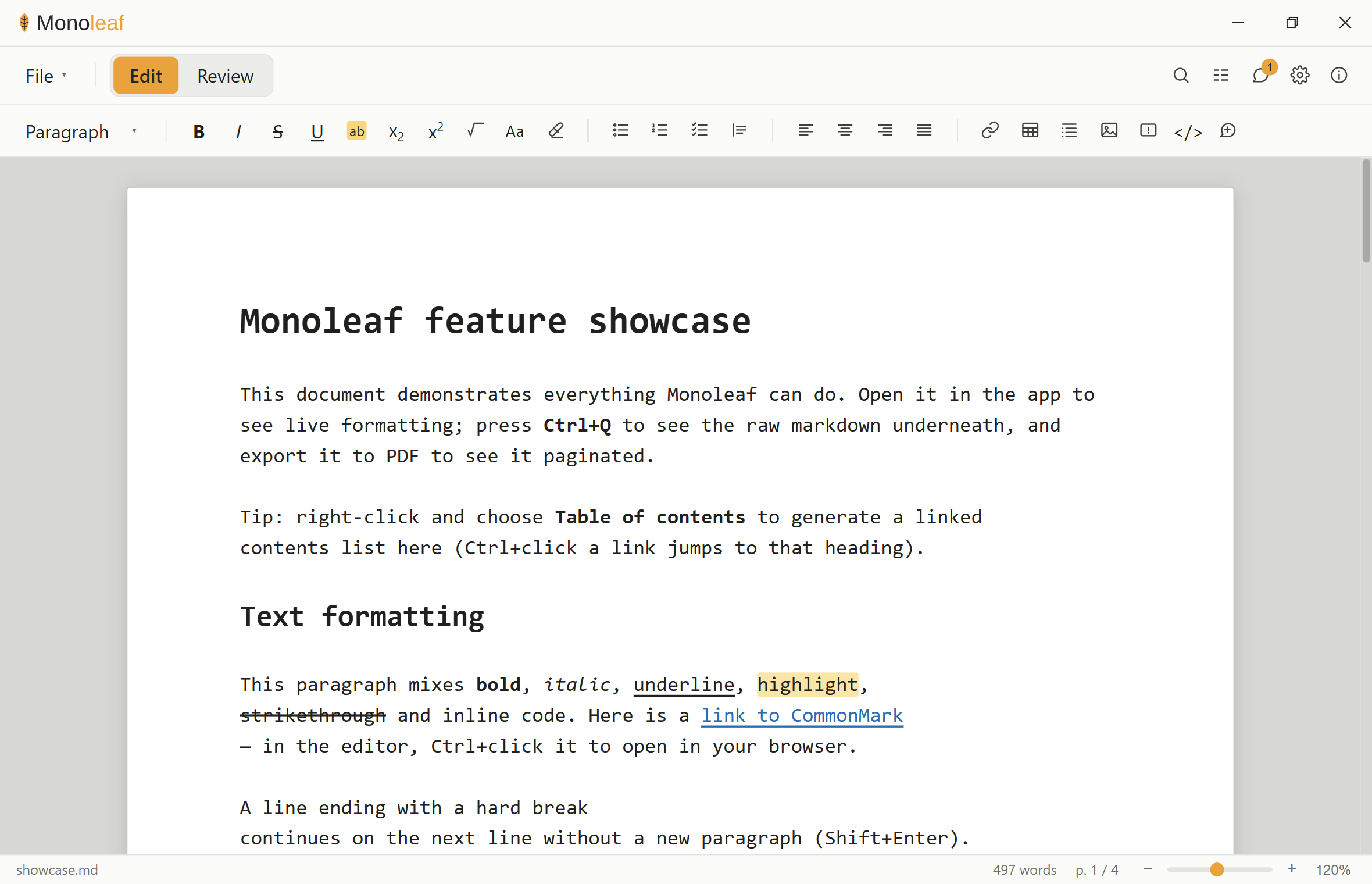
.md files when you double-click themEverything above is a claim about a file format. This is the part that has to feel like a word processor: a real toolbar, a page you can see the edges of, a word count and a page number in the status bar. The document on screen is the same plain text the panel above was showing.
The usual document formats are zip archives of XML that describe a document. A
.md is the document.
That difference used to be a matter of taste. Now it decides whether a model can work on
your writing at all.
No converter, no unzipping, no XML tree to walk and rebuild. The bytes the model sees are the bytes you wrote, and the bytes it returns are a file you can open. Fidelity is not something the pipeline can lose, because there is no pipeline.
Markdown gives about a tenth of a file to structure. The same document as zipped XML gives roughly seven tenths of it to markup, and stripping that back out to make room throws the headings, tables and tracked changes away with it. Markdown keeps both.
Because tracked changes are just {++text++} and {--text--}, a model can propose edits inside the file and you accept or reject each one. Nothing is silently rewritten, and you review a model's work the same way you review a colleague's.
Revert every mark in a reviewed file and you should get the original back, byte for byte. That is a check a script can run. If a model touched prose outside its marks, the check fails and you know before you read a word.
git diff works on proseEvery revision is a real diff with real line history, reviewable in a pull request. Not a binary blob and a compare-documents dialog that reconstructs its guess of what changed.
Open a file and save it untouched and it is identical: line endings, byte order mark, missing trailing newline and all. That is a property a test can assert, and Monoleaf's suite asserts it. An editor that quietly normalises your file is an editor that writes diffs you did not.
Comments, tracked changes, page setup and metadata travel with the document. Email it, commit it, drop it in a folder for ten years. There is no second file to lose and no account to still have.
Those two proportions are measured rather than estimated. Take a document's XML, strip
every tag, and compare what is left against the whole; then do the same for markdown
syntax in a .md. Both counts are by character, and a tokeniser splits tags
harder than it splits prose, so the real gap is wider than the figures above.
No feature is worth a file that reads as garbage somewhere else. This is the honest table, including every place the syntax does show through.
| Construct | Monoleaf | Other readers | Plain text |
|---|---|---|---|
| Headings, emphasis, lists, tables, codeCommonMark and GFM baseline | renders | renders | clean |
| <u> <mark> <div align>Underline, highlight, alignment | renders | renders | tags visible |
| > [!NOTE]Callouts | renders | reads as a quote | reads as a quote |
| [^1]Footnotes | renders | renders | clean |
| $…$ and $$…$$LaTeX maths, KaTeX | renders | varies | reads as LaTeX |
| <img src="https://…">Hosted images, left unloaded until you enable them | opt-in | renders | tag visible |
| <!--ml:pagebreak--> · <!--ml:page …-->Page breaks and page setup | applied | invisible | invisible |
| <!--ml:meta …-->Document metadata. YAML front matter also accepted | applied | invisible | invisible |
| <!--c:id-->Threaded comments | renders | invisible | invisible |
| {++ ++} {-- --} {~~ ~> ~~}Tracked changes, CriticMarkup | renders | literal | literal |
| H~2~O · E = mc^2^ · :smile:Subscript, superscript, emoji. All three flagged | renders | literal | literal |
“Other readers” means any CommonMark and GFM viewer: GitHub, VS Code, Obsidian, pandoc.
The column states the weakest behaviour among them, so nothing here is a promise
a particular reader will break. Several do more: GitHub styles callouts as alerts and
renders maths, and most render :smile:.
“Invisible” means the construct is an HTML comment: the reader sees clean prose and nothing else.
“Literal” means the syntax shows up instead of rendering, and three things can do that.
Tracked changes, where it is the point: a reviewer without Monoleaf still has to see
what was proposed. Subscript, superscript and emoji shortcodes, which Enhanced mode
flags as you type, so you know before you send the file. And maths, in a reader with
no maths support, which Monoleaf does not currently flag. The demo panel at the top of the
page shows all three.
Windows is the tested, primary build. Monoleaf is a Tauri application, so the same source also ships as a macOS disk image and a Linux AppImage, both best-effort: macOS is unsigned and unnotarized, and Linux is community-tested rather than exercised as broadly as Windows.
Per-user installNo administrator rights needed. If the machine is missing the Microsoft WebView2 runtime, the installer fetches it.
Not code-signedWindows SmartScreen will warn about an unknown publisher the first time you run the installer. Choose More info → Run anyway. Signing means paying a commercial certificate authority every year, which is hard to justify for a free tool with one maintainer, so it is not planned rather than pending. The source is public if you would rather build it yourself.
macOS is unsignedThere is no Apple Developer account, and none is planned, so the .dmg is unsigned and unnotarized. Gatekeeper refuses a plain double-click as "damaged": right-click (or Control-click) the app and choose Open, then confirm Open again.
Linux is best-effortThe AppImage is community-tested, not exercised as broadly as Windows. Please file an issue if you hit a problem with it.
Web version Betaweb.monoleaf.org runs the same editor in the browser, byte-for-byte round-trip included, but a few things do not carry over: PDF import is desktop-only, saving in place only works in Chromium browsers (Firefox and Safari download a copy instead), and there is no native spell-check dictionary, in-app updater, or reopen-last-file on launch. Source and releases
Reviewing with ClaudeA plain-text format means an AI assistant can already open and edit these files. Getting the full syntax right (tracked changes, threaded comments, page setup) is a different matter: Monoleaf Reviewer is a Claude Agent Skill that encodes those conventions and ships a validator to catch mistakes before they land. Checking latest release…